Automated Lead Response for Canadian Businesses | NordicCRM
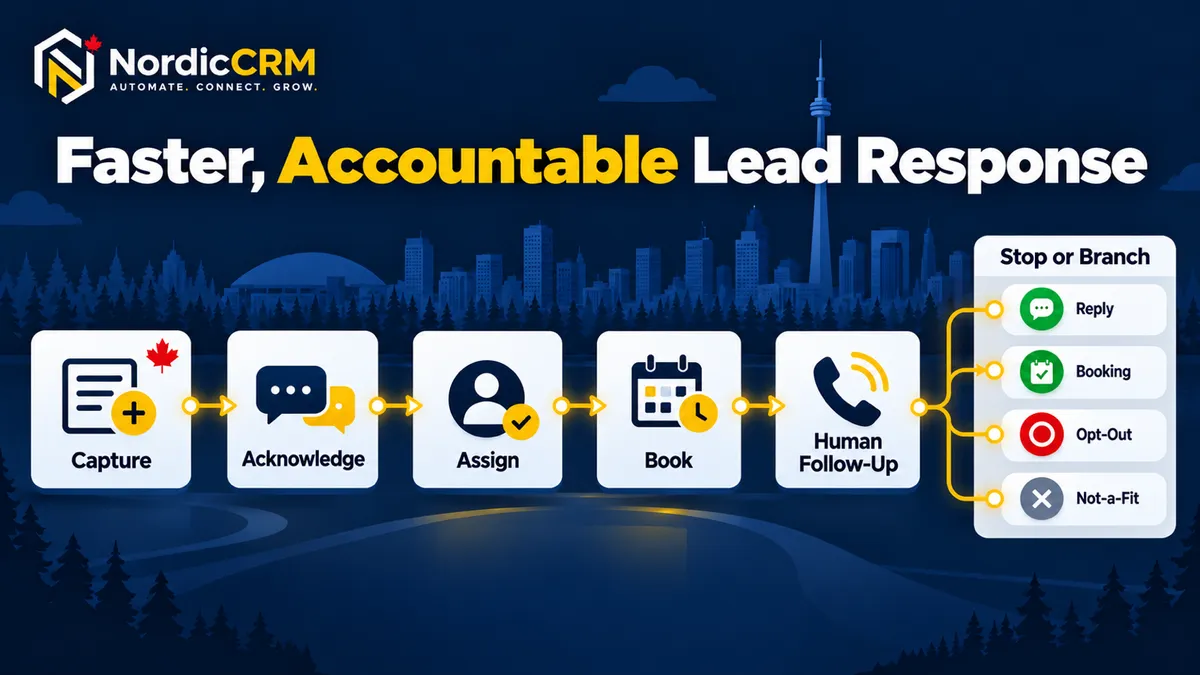
Quick answer: A reliable lead-response workflow should capture the enquiry, create or update one contact record, send an honest acknowledgement, assign an owner, create the next action, offer a useful booking path and stop or change follow-up when the contact replies, books, opts out or is no longer a fit.
A new enquiry should not disappear into an inbox while everyone assumes someone else will answer it. For a Canadian service business, effective lead-response automation is not about sending more messages. It is about making sure every legitimate enquiry is acknowledged, assigned and given a clear next step—while keeping people in control of the conversation.
This practical guide explains the workflow NordicCRM uses when helping small service teams organize lead response. It also shows where automation should stop, what must be configured carefully and how to evaluate whether the process is helping.
Why lead response breaks down
Most missed opportunities are not caused by a complete lack of software. They happen because the handoff between tools and people is unclear.
Website forms deliver to a shared inbox with no owner.
Facebook or Instagram leads live in a separate system.
Missed calls are reviewed only when someone has time.
Appointment requests do not create a pipeline record or follow-up task.
Automated messages continue after the prospect has replied.
Sales staff rely on memory instead of a visible next action.
Duplicate contacts make the customer history difficult to understand.
The objective is not to automate every interaction. It is to remove uncertainty from the first few steps.
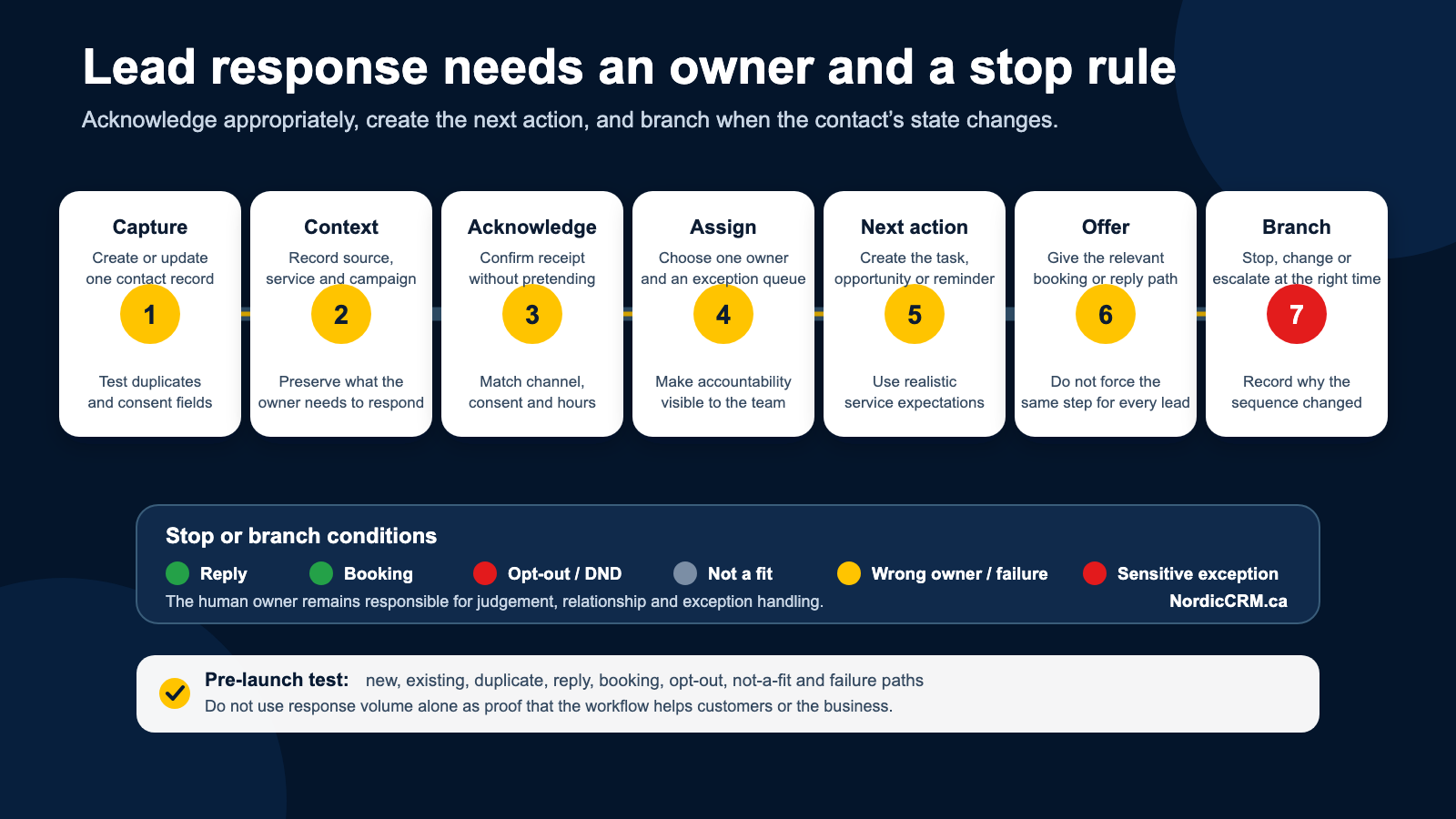
The seven-part lead-response workflow
1. Capture the enquiry in one contact record
Connect each important lead source to the CRM: website forms, landing pages, chat widgets, supported social lead forms, inbound and missed calls, calendar bookings, and manually entered referrals. The system should create a record for a genuinely new person and update the existing record when a matching contact already exists. Test field mapping, duplicate handling and consent data before launch.
2. Record the source and enquiry context
The person responding needs to know why the lead contacted the business. Capture the campaign, page, service interest, location, submitted message, appointment status, owner and communication preferences when they are available. Avoid collecting sensitive information that the workflow does not need.
3. Send an appropriate acknowledgement
An acknowledgement confirms that the enquiry arrived and explains what happens next. It should never pretend a person has reviewed the request when they have not.
Thanks for contacting [Business Name]. We received your request about [service]. A member of our team will review it during our published business hours. If you prefer, you can choose an available time here: [booking link].
The wording, channel and timing should match the customer’s action and the business’s actual operating hours. Email, SMS and other commercial electronic messages may carry consent, identification and unsubscribe responsibilities. Automation does not remove those obligations. Review the CRTC’s CASL guidance and obtain qualified advice for your situation.
4. Assign a clear owner
Every qualified lead needs one person or monitored queue responsible for the next step. Assignment rules may use service type, territory, team availability, round-robin distribution, existing customer ownership or qualification criteria. If the system cannot assign confidently, route the lead to a review queue instead of silently failing.
5. Create the next action
An owner without a next action is still a weak handoff. Create a task, opportunity or notification that says what to do and when—for example: review the enquiry, call during business hours, confirm service-area fit, prepare an estimate or follow up after a missed appointment.
6. Offer the right next step
Not every lead should be pushed directly to a calendar. Self-booking can work well when the service and appointment type are clear. Complex, regulated or high-value enquiries may require human qualification first. The next step should reduce friction without forcing the prospect into the wrong path.
7. Stop, branch or escalate at the right moment
The workflow must react to customer behaviour. Follow-up should change when the contact replies, books, reschedules, cancels, completes a requested form, becomes a customer, is marked unqualified or opts out. This suppression logic is one of the most important differences between useful automation and spam.
A five-minute audit of your current process
Did the lead create or update the correct contact record?
Can the team see the source and reason for the enquiry?
Did the customer receive an honest acknowledgement?
Was one owner assigned?
Was a specific next action created?
Did the customer receive an appropriate booking or response option?
Would the automation stop if the customer replied, booked or opted out?
If any answer is no, that is the first part of the workflow to repair.
What to measure
Avoid judging the workflow by message volume. Useful measures include:
Percentage of valid enquiries captured successfully.
Time from enquiry to the first appropriate acknowledgement.
Time from enquiry to human review.
Percentage of leads with an owner and next action.
Booking and reply rates by source and follow-up step.
Opt-out, complaint and delivery-failure rates.
Leads that reach a stale stage without activity.
Qualified opportunities, appointments and customers attributed to the original source.
The right target depends on business hours, staffing, service complexity and customer expectations. Do not publish a response-time promise the team cannot consistently meet.
Where NordicCRM fits
NordicCRM connects lead capture, conversations, calendars, tasks, opportunities and automation in one workspace. The platform is powered by HighLevel and implemented and supported by NordicCRM for Canadian businesses.
A scoped implementation can include reviewing current lead sources, mapping fields and pipeline stages, configuring acknowledgements and assignment rules, connecting supported forms and calendars, adding reply and opt-out safeguards, controlled testing, and team training.
Feature availability, messaging registration, phone numbers, email delivery, AI services, usage charges and third-party connections vary by plan and configuration. NordicCRM subscriptions are billed in Canadian dollars; certain provider or AI charges may be separate when disclosed on the order.
Explore NordicCRM sales automation, learn about SMS and missed-call follow-up, or review the CRM migration guide.
Frequently asked questions
Should every new lead receive an instant SMS?
No. The appropriate channel depends on what the person submitted, the consent available, the business context and the configured sender. An email acknowledgement or internal task may be more appropriate in some situations.
Can automation replace the sales team?
Automation can handle repeatable administrative steps, but qualification, advice, exceptions and relationship-building often require a person. A good workflow makes the human handoff clearer.
What happens outside business hours?
The acknowledgement should state realistic expectations. A business may offer self-booking or collect additional information, but it should not imply immediate human review if no one is available.
How do we prevent automated follow-up after a reply?
Use workflow exit conditions or suppression actions triggered by replies, appointments, opt-outs and relevant contact or opportunity statuses. Test each exit path before launch.
Can NordicCRM import leads from another CRM?
NordicCRM can scope migrations from supported sources. Record types, fields, files, consent data, historical activity, workflow rebuilding and volume must be reviewed before the migration is approved.
Build a response process your team can operate
The best lead-response workflow is not the one with the most steps. It is the one your team understands, monitors and improves. NordicCRM can review your current lead sources, identify the first broken handoff and scope a practical response workflow around your team.
Book a guided lead-response workflow review.
Author: NordicCRM Team. Last reviewed: November 2, 2026.