Email Templates, Lists and Segmentation | NordicCRM Guide
Quick answer: Create a reusable email template with a recognizable sender, useful content, one primary action and an accurate company footer. Build the audience from verified contact fields and exclusions, then review the final recipients before scheduling or sending.
Prepare contact data before building the campaign
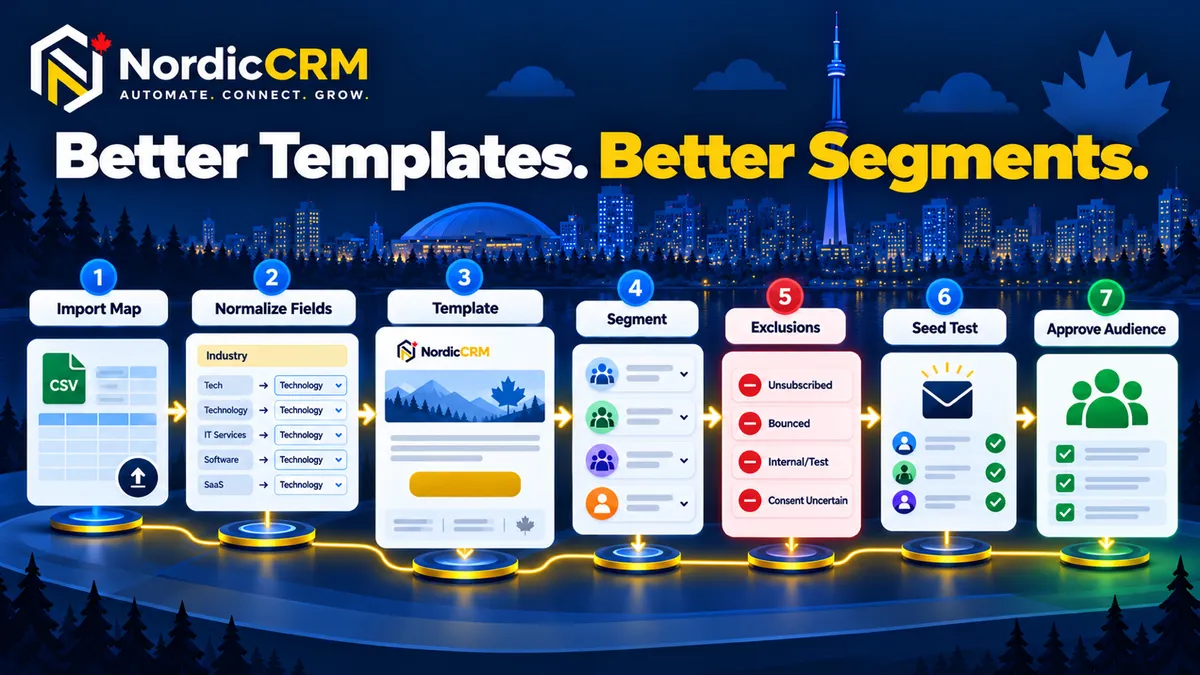
An email campaign is only as reliable as the contact data behind it. For a HubSpot or spreadsheet import, create a mapping sheet that identifies the source field, NordicCRM destination field, data type, allowed values, required cleanup, segmentation purpose and the meaning of each consent or communication-preference field.
Map and normalize industry data
An Industry value cannot power a reliable segment if it was not mapped, was stored inconsistently or contains free-text variations such as “Construction,” “construction company” and “Contractor.” Create a controlled list of industry values and preserve the original value in a separate field whenever cleanup requires judgement. Test a small sample before updating the full import.
Preserve communication status
Do not infer consent merely because a contact exists in another CRM. Preserve available source, timestamp, purpose, opt-out and do-not-contact information. Escalate uncertain records for review.
Build a reusable email template
Give each template one primary job: confirm an appointment, share a guide, invite a contact to an event or introduce an approved offer.
Use a recognizable sender and clear subject.
Open with language that matches the relationship.
Deliver one useful message.
Use one primary button or text link.
Add the accurate company footer.
Include the required preference or unsubscribe path where applicable.
Images, buttons and the company footer
Use descriptive alt text and keep the message understandable when images do not load. Button text should describe the action—such as “Book a consultation” or “Read the migration guide”—instead of “Click here.” The footer must use the approved business identity and contact information; do not invent a mailing address, legal entity or support promise.
Create a segment that another team member can audit
A useful segment combines inclusion and exclusion rules. Possible inclusion criteria include approved industries, Canada as the country, an appropriate lifecycle or opportunity status and the relevant relationship or permission.
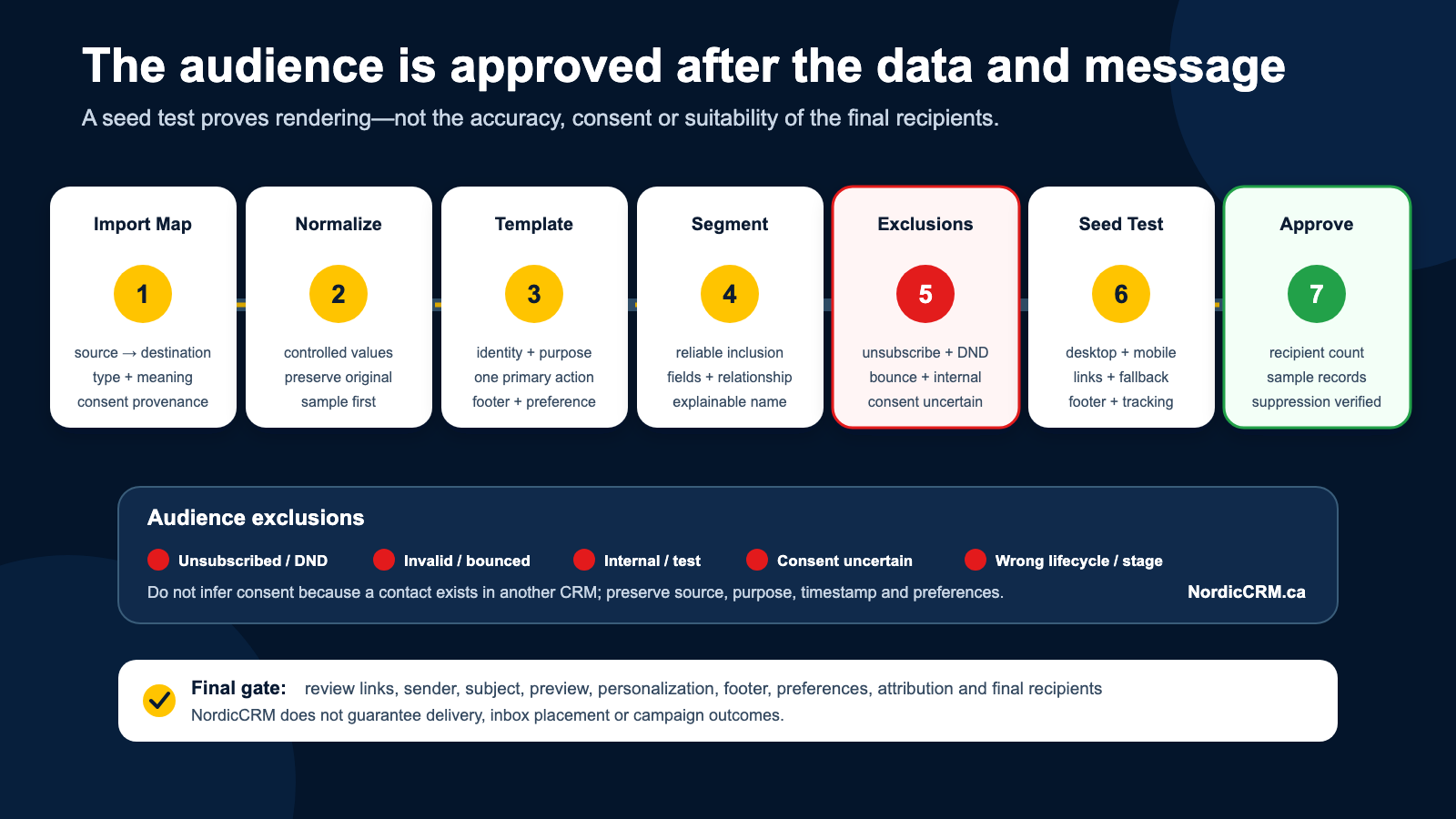
Exclude unsubscribed or do-not-contact records, invalid or bounced addresses, customers or opportunity stages that should not receive the offer, internal/test records and records with missing consent or uncertain import status.
Use a plain-language name such as CA | Construction | Approved newsletter audience | 2026-11.
Test before sending
Send to an internal seed list.
Check desktop and mobile rendering.
Confirm every link and button destination.
Confirm personalization fallbacks.
Review sender identity, subject and preview text.
Verify the footer and preference links.
Review the final recipient count and a sample of records.
Confirm suppressed contacts are excluded.
Check tracking and attribution settings.
Important: Sending a test is not the same as approving the final audience.
When the Industry field is missing after a HubSpot import
Inspect the original export header and sample values.
Confirm a destination field exists and has the correct type.
Create a source-to-destination mapping table.
Normalize obvious variants in a controlled copy.
Test a small update against synthetic or approved records.
Verify existing contacts update rather than duplicate.
Rebuild and review the segment.
Keep a backup of the source export and a record of every transformation.
Where NordicCRM fits
NordicCRM is powered by HighLevel and implemented and supported by NordicCRM for Canadian businesses. A scoped service can include field mapping, data-cleanup rules, template setup, segmentation, deliverability checks and team training.
Email delivery, dedicated domains, usage charges, limits and supported features vary by plan and configuration. NordicCRM does not guarantee delivery, inbox placement or campaign outcomes. AI assistance is optional, may require separate setup and may create additional charges.
Frequently asked questions
Why can’t I drag an element into the email builder?
Confirm that you are editing the email body in the supported builder rather than viewing a read-only preview or a blocked browser state. Check zoom, refresh the editor and test a different supported browser session before rebuilding the template.
Is AI required to build an email?
No. A standard template can be created manually. AI assistance is optional and may involve additional billing.
Is a smart list the same as a campaign?
No. A list or segment defines contacts that match rules. A campaign or workflow defines what happens to the approved audience.
Can NordicCRM repair a HubSpot import?
NordicCRM can assess the export, mapping, fields and duplicate strategy. The scope depends on data volume, data quality, objects and required history.
Create a segment you can explain
NordicCRM can review your import, repair the Industry mapping and help build a reusable template and campaign audience.
Request a data-and-campaign review
Related resources: CRM migration guide, pricing and AI cost clarity, and the CRM integration guide.