Follow-Up Automation Without Spam
Useful automation helps a person complete the next step they reasonably expect. Spam ignores context, permission and customer behaviour.
For commercial electronic messages in Canada, the CRTC identifies three general requirements: obtain consent, provide identification information and include an unsubscribe mechanism. The sender is responsible for understanding whether express consent, implied consent or an exception applies to the specific message. This guide describes operational controls, not legal advice.
Quick answer: Record the source and scope of consent, send only the messages that match that purpose, identify the sender, provide a working unsubscribe path, stop when the contact replies or opts out, and give a person ownership of exceptions.
Start with the relationship, not the sequence
Before building steps, document:
What the person did.
What they reasonably expect next.
Whether the message is commercial.
The consent, exemption or other basis the business relies on.
Who is sending and on whose behalf.
The relevant service, product or request.
When follow-up should stop.
Do not treat a purchased, scraped or imported list as an approved audience merely because the CRM accepts the file.
Keep evidence of consent and preferences
Useful fields can include:
Consent type and scope.
Source form or event.
Date and time.
Wording shown at collection.
Sender or business identity.
Communication channel.
Opt-out date and method.
Data source and import batch.
Notes for uncertain or manually reviewed records.
The CRTC states that the onus is on the sender to prove consent and recommends records that support the basis relied upon. Implied-consent periods and exceptions are fact-specific; obtain legal advice for the business’s circumstances.
Design a restrained sequence
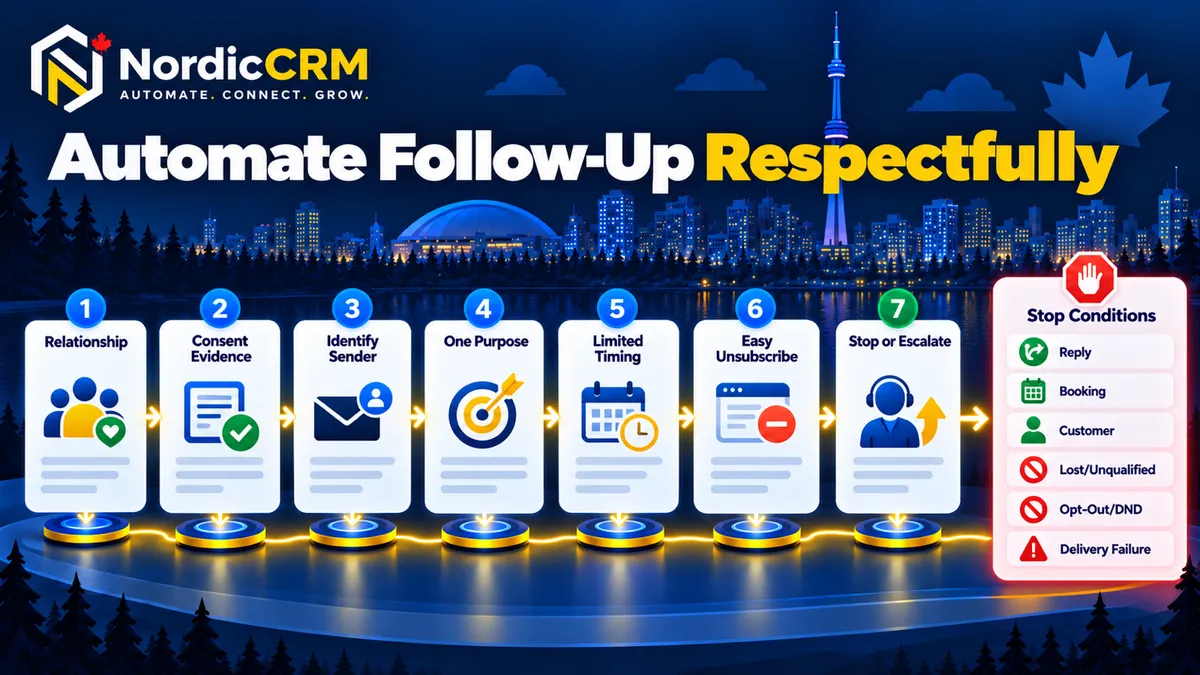
1. Send an honest acknowledgement
Confirm receipt and explain the next step. Do not say a team member has reviewed the request when no one has.
2. Give each message one purpose
A reminder, estimate follow-up and newsletter are different contexts. Do not quietly expand a narrow request into a broad promotional sequence.
3. Use realistic timing
Match published business hours and the buying cycle. More touches do not automatically produce better outcomes.
4. Make the sender clear
Use the approved business and contact information. If the message is sent on behalf of another party, confirm the applicable identification requirements.
5. Provide an easy unsubscribe path
The CRTC describes the mechanism as simple, quick and easy to use. Test the link or supported keyword and verify that the resulting suppression reaches every relevant workflow.
6. Stop or branch on behaviour
Exit the sequence when the contact:
Replies.
Books, reschedules or cancels.
Becomes a customer.
Is marked lost or unqualified.
Opts out or is placed on do-not-contact.
Reaches a condition that requires human review.
7. Limit channel switching
Permission and context for email do not automatically authorize every other channel. Define the rules for each channel.
Suppression checklist
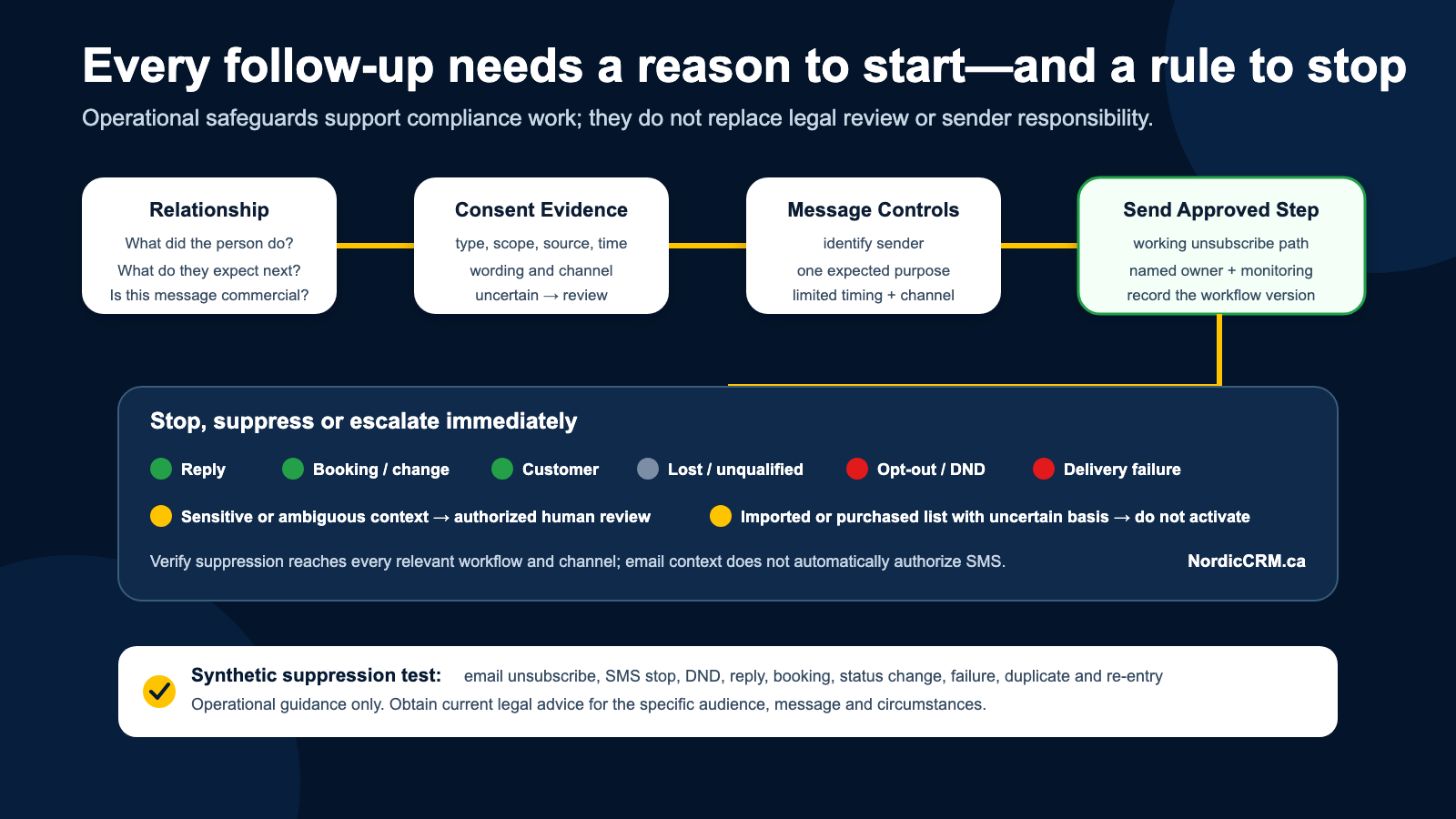
Test each condition with synthetic contacts:
Email unsubscribe.
SMS stop request.
Manual do-not-contact update.
Reply received.
Appointment booked.
Opportunity marked customer, lost or disqualified.
Invalid address or delivery failure.
Duplicate contact.
Imported contact with uncertain consent.
Workflow re-entry after a later form submission.
Measures that reveal problems
Opt-out and complaint rate by source.
Delivery failures.
Replies that did not stop automation.
Messages sent after booking or purchase.
Contacts without consent-source evidence.
Duplicate and conflicting preference records.
Manual exceptions and workflow errors.
Qualified replies, appointments and opportunities—not raw send volume.
Where NordicCRM fits
NordicCRM can connect contact fields, forms, conversations, opportunities, calendars and workflow suppression. It is powered by HighLevel and implemented and supported by NordicCRM for Canadian businesses.
The platform does not make a business compliant automatically. The customer remains responsible for its audience, consent, message, sender identity and legal obligations. Email, SMS, phone, AI and other usage may be billed separately depending on plan and configuration.
Frequently asked questions
Can we email every contact imported from another CRM?
Not solely because the record imported successfully. Review the source, purpose, consent evidence, preferences and applicable law before including the contact.
Can an email ask for consent?
The CRTC states that an electronic message requesting express consent is itself a commercial electronic message, so it is not automatically a valid way to obtain consent when no other basis exists.
How quickly must unsubscribe requests be handled?
Use current legal guidance and counsel for the exact requirement. Operationally, NordicCRM workflows should suppress the contact immediately when the supported opt-out signal is received.
Does CASL cover SMS?
The CRTC explains that commercial text messages sent to an electronic address can fall under CASL. Telephone calls are governed under different rules.
Build follow-up people can trust
NordicCRM can review the audience, fields, sequence and suppression paths before a workflow goes live.
Primary CTA: Book a follow-up workflow review.
Secondary CTA: Review NordicCRM sales automation.
Related NordicCRM guides
Primary sources
NordicCRM is powered by HighLevel. Features depend on plan and configuration. Communications, phone, AI, usage-based services, third-party services and implementation may carry separate charges. Confirm current terms, permissions and written scope before launch.