CRM Customer Communication Guide for Canadian SMBs
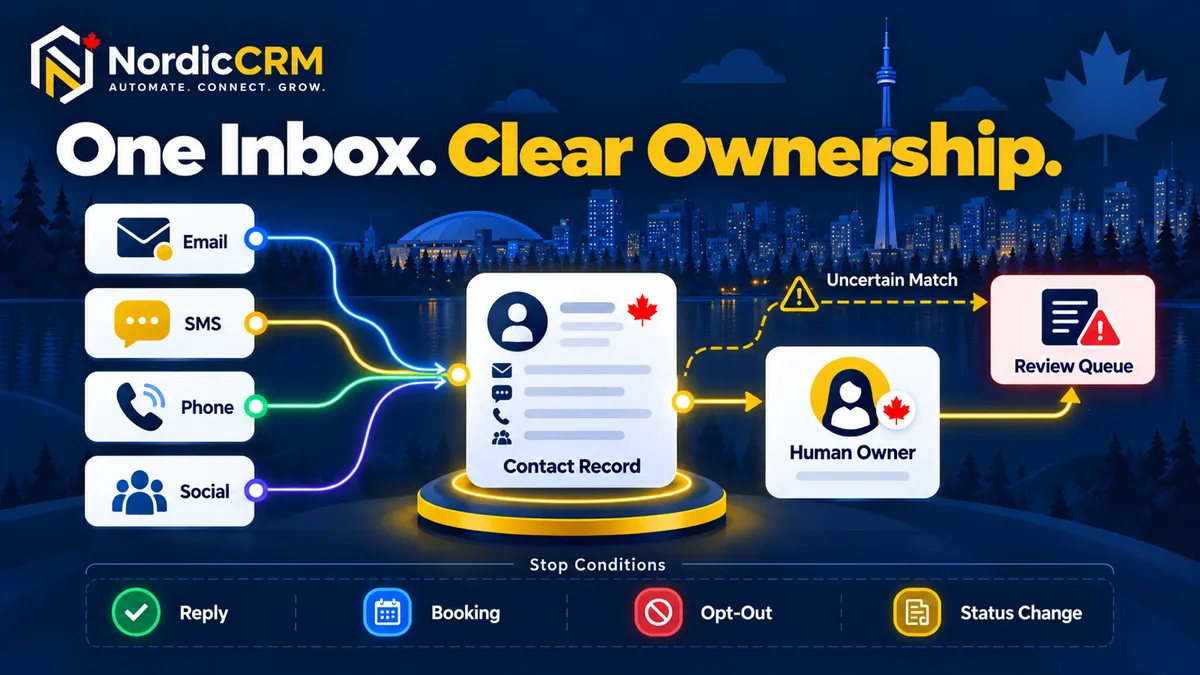
Customer communication breaks down when enquiries, appointments, email, text messages and internal notes live in separate tools. A CRM can bring supported conversations and customer context into one operating view. The benefit depends on accurate contact matching, clear ownership, response rules and automation that stops when the situation changes.
Quick answer: A CRM streamlines customer communication by associating supported messages and activities with the correct contact, showing the history needed for context, assigning the next response, and stopping conflicting follow-up after a reply, booking, opt-out or status change.
Primary action: Book a conversation-workflow review
Feature overview: Explore SMS and customer communication
What a customer-communication CRM should help the team answer
For every active conversation, the team should be able to identify:
Who is contacting us?
Which channel and source produced the message?
Why are they contacting us?
Who owns the next response?
What happened before this message?
What action or automation must stop, continue or escalate?
A shared inbox should not become an unmonitored archive. It needs an operating routine.
Six controls behind a useful unified inbox
1. Connect only supported and approved channels
Start with channels the business can operate consistently. Email, phone, SMS, website chat, social messaging, WhatsApp and other channels can require separate providers, permissions, registration, authentication and plan access. Test each enabled channel before customer use.
2. Match the conversation to the right contact
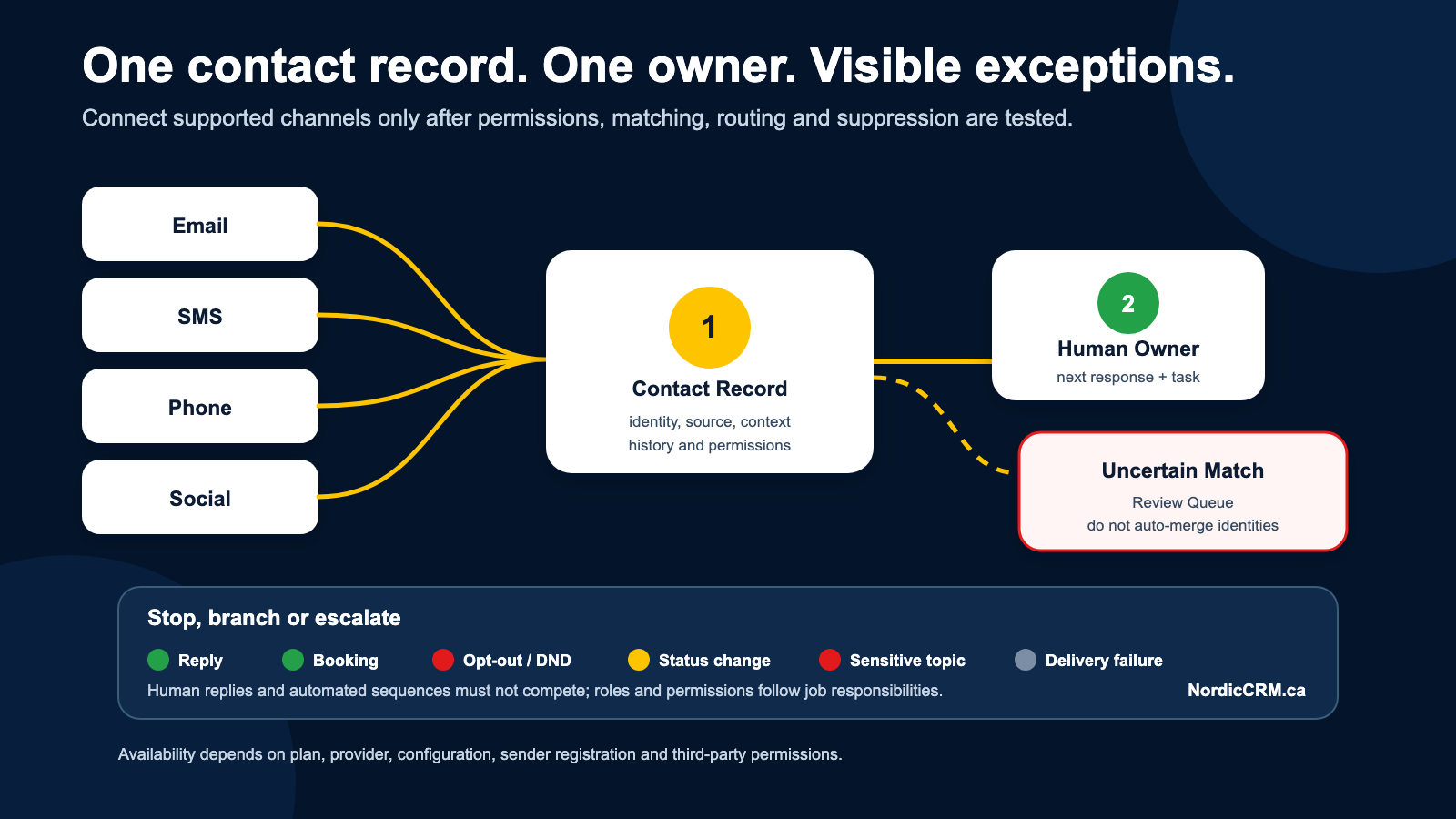
Use reliable identifiers and documented duplicate rules. When a confident match exists, the new activity should update the trusted contact. An uncertain match should enter a review process instead of being joined automatically.
3. Show the context needed for the response
The owner may need the lead source, service interest, form submission, appointment, opportunity, invoice or recent conversation history. Show only information appropriate to the person’s role. A general CRM inbox is not a substitute for a secure clinical, legal, financial or human-resources record system.
4. Assign one accountable owner
Define who handles new enquiries, appointment changes, sales conversations, billing questions, customer support and complaints. Round-robin assignment can distribute work, but unassigned and exception queues still need active monitoring.
5. Set response and handoff rules
Use published business hours and realistic expectations. An automated acknowledgement may confirm receipt. It must not suggest that a human reviewed the message when that did not happen. Escalate sensitive, ambiguous or high-impact situations to an authorized person.
6. Stop conflicting automation
A customer reply, booking, opt-out, customer status, lost opportunity or manual intervention should stop or branch the relevant sequence. Human replies and automated messages should not compete with one another.
Customer communication operating model
Stage | Team decision | Healthy evidence |
|---|---|---|
Intake | Which supported channel created the conversation? | Channel and source retained |
Identity | Which contact does the message belong to? | One trusted record or review queue |
Ownership | Who is responsible now? | Named owner or monitored queue |
Context | What does the owner need to respond appropriately? | Relevant history with role-based access |
Action | What response, task, booking or opportunity step follows? | One visible next action |
Suppression | What event stops or changes automation? | Reply, booking, opt-out and status rules tested |
Escalation | Which cases need authorized review? | Defined path and accountable recipient |
Measurement | What outcome should be recorded? | Response, booking, opportunity or support outcome |
A practical daily inbox routine
Review unassigned and unread conversations.
Confirm every active conversation has an owner and next action.
Resolve duplicate or uncertain contact matches.
Move booking and sales conversations to the correct opportunity or appointment state.
Escalate sensitive, legal, billing, complaint or safety-related messages to an authorized person.
Review failed delivery, authentication, opt-out and workflow error signals.
Close completed conversations without deleting history the organization still needs lawfully.
Deleting a conversation can be permanent in some interfaces. Define retention and deletion rules before using bulk actions.
Where automation helps—and where it should pause
Automation can:
acknowledge a new enquiry;
assign an owner or task;
send an approved reminder;
update a pipeline or appointment state;
alert a team member when no response occurs;
record source and campaign context.
Automation should pause, branch or escalate when:
the customer replies;
the customer books or cancels;
the person opts out or requests no contact;
the contact becomes a customer or a lost opportunity;
the message contains an exception, complaint or sensitive issue;
a human takes ownership.
Continue with the automated lead-response guide for intake and routing. Review the AI use cases and limits guide before assigning customer-facing responses to an AI agent.
What to measure
Use measurements that reveal operating problems rather than vanity activity.
Unassigned conversations.
Unread conversations beyond the team’s published response standard.
Conversations without a next action.
Duplicate or uncertain-contact rate.
Delivery failures and opt-outs.
Appointment, opportunity or support outcomes by source.
Conversations that required escalation or manual correction.
Workflow errors associated with communication actions.
Faster is not always better. Measure an appropriate response, not only elapsed time.
Canadian consent and privacy controls
CRTC guidance says commercial electronic messages generally require consent, sender identification and a working unsubscribe mechanism, subject to the specific circumstances and applicable exemptions. SMS can fall within those requirements. Keep the evidence for the consent or other basis the organization relies on, and apply unsubscribe requests consistently.
Collect only the information needed for an identified purpose, restrict access by role and define retention. NordicCRM can support contact history, preferences, assignments and suppression rules. It does not automatically make a business compliant with CASL, PIPEDA or other applicable laws.
Where NordicCRM fits
NordicCRM is a Canadian-owned CRM and automation service powered by HighLevel. Depending on the plan, connected providers, permissions and configuration, NordicCRM can bring supported conversations, contacts, assignments, calendars, opportunities and workflows into one operating environment.
Phone numbers, carrier usage, SMS or MMS, email delivery, sender registration, WhatsApp, paid AI, premium workflow actions, third-party services and custom implementation may create separate charges. The current order, provider terms and written implementation scope control.
Frequently asked questions
Does every communication channel appear automatically?
No. Channels require the applicable connection, provider, permission and configuration. Availability varies, and each enabled channel must be tested.
Can everyone see every customer conversation?
They should not by default. Access should follow job responsibilities. Review roles and permissions before connecting customer communication.
Should an AI agent answer every message?
No. AI may assist with clearly defined, low-risk tasks. Ambiguous, sensitive, consequential or exceptional conversations need human review. Paid AI and usage may also create separate charges.
How do we prevent duplicate replies?
Assign one owner, define the next action, and test suppression triggered by replies, bookings, opt-outs and status changes. Review automation history when a duplicate reply occurs.
Can a CRM replace our specialist customer-record system?
Not necessarily. Clinical, legal, financial, HR and other sensitive records may require a purpose-built system. Keep only the necessary operational context in the CRM and obtain appropriate professional guidance.
Does a unified inbox guarantee faster response or more sales?
No. Results depend on staffing, operating standards, configuration, message volume, data quality and adoption. A unified inbox makes ownership and context clearer; it does not guarantee a business outcome.
Build an inbox your team can operate
NordicCRM can review your current channels, identify the first broken handoff and scope a conversation workflow with clear ownership, suppression and escalation rules.
Book a conversation-workflow review
You can also explore SMS and missed-call communication, review automated lead response or compare NordicCRM pricing and AI costs.
Author: NordicCRM Team
Last reviewed: November 3, 2026
Method: Requirements-first communication workflow guidance based on controlled NordicCRM entitlements, current platform documentation and Canadian regulator guidance. No performance guarantee.