CRM Integration Guide for Canadian Small Businesses
Quick answer: Integrate a CRM by mapping one business event at a time. Define the source system, required fields, contact identity, consent, owner, next action, failure path and measurable outcome before connecting any software.
A CRM integration should reduce duplicate entry and preserve context across the customer journey. It should not create an invisible chain of automations that nobody owns. For a Canadian small business, the best starting point is usually one controlled journey—such as a website enquiry becoming an owned follow-up task—tested from end to end before more systems are added.
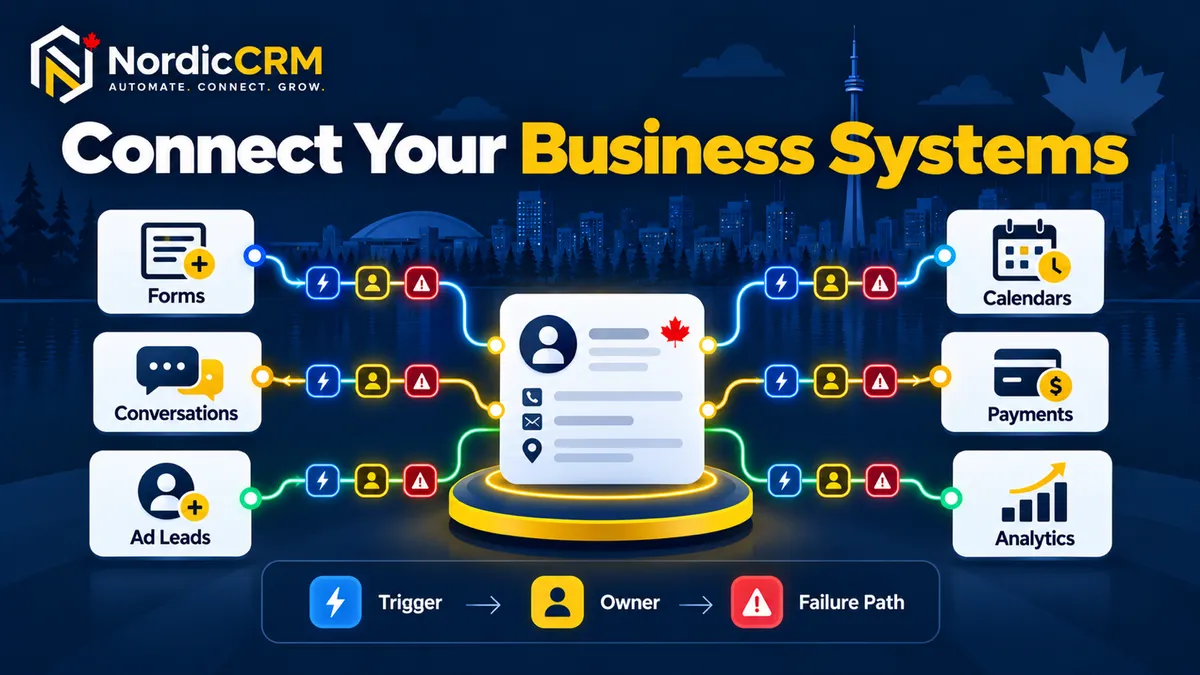
This guide explains how to connect forms, calendars, email, SMS, payments and other business systems while keeping data ownership, permission, monitoring and recovery visible. NordicCRM is powered by HighLevel; available connections and actions depend on the selected plan, provider, configuration and approved implementation scope.
What CRM integration should accomplish
Capture customer information once and carry the right context forward.
Identify which system owns each field and status.
Assign every qualifying record to a person or monitored queue.
Respect consent, unsubscribe and suppression rules across channels.
Expose failures instead of silently losing leads or creating duplicates.
Measure the business outcome, not only whether a connector ran.
Step 1: Write the business event in plain language
Begin with a sentence that a non-technical operator can verify. For example: “When a visitor submits the consultation form, create or update the contact, preserve the source, assign an owner, send an acknowledgement and create the next task.”
That sentence establishes the trigger, the record, the owner and the customer-facing result. It also reveals questions that a generic “connect the CRM” request hides: Which form? How is an existing contact matched? What counts as a valid source? Who receives the record after hours? What stops follow-up when the person replies or books?
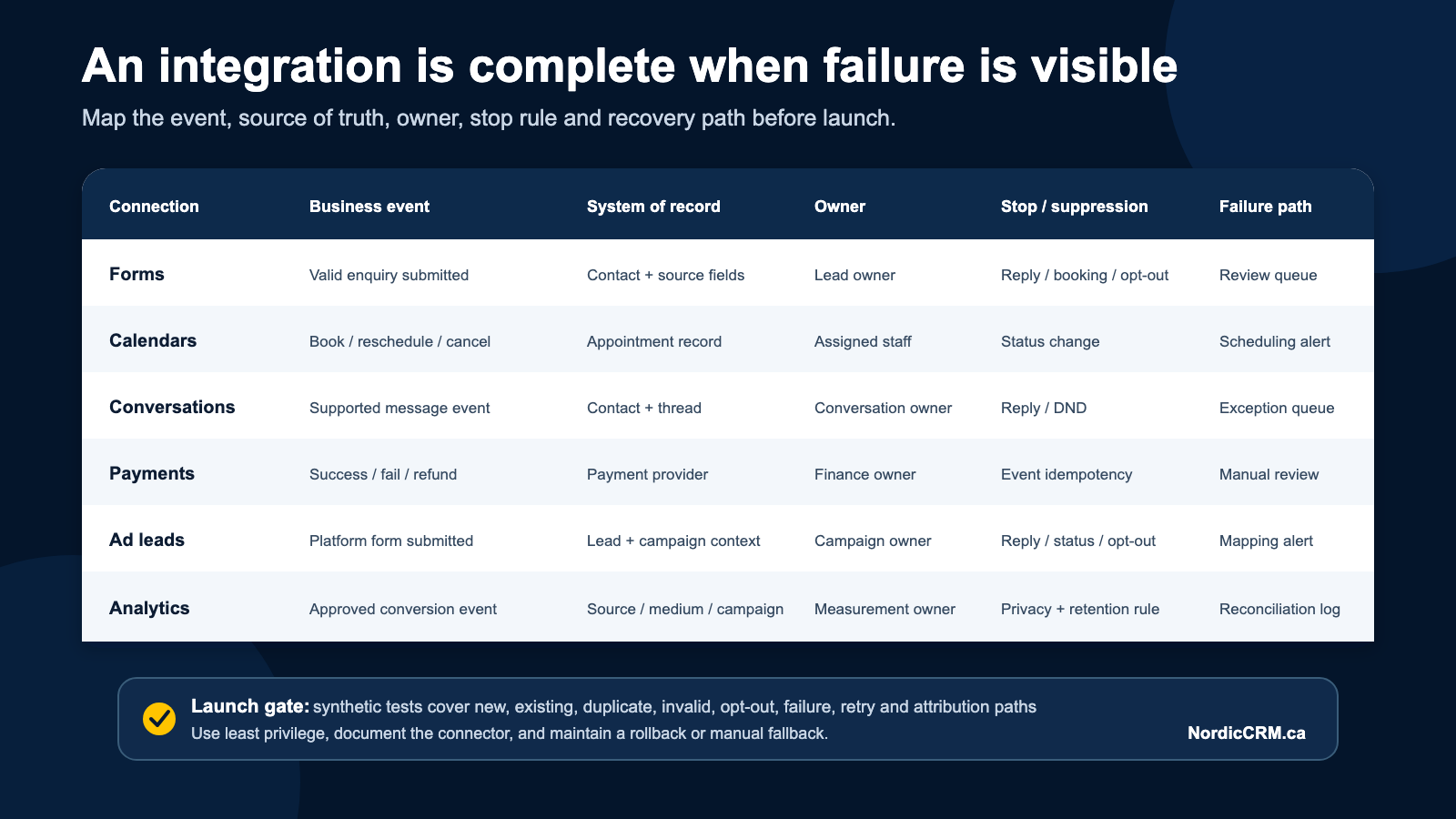
Step 2: Complete the integration control map
Control | Decision to document | Release evidence |
|---|---|---|
Identity | Which fields match or create a contact? | New and existing contacts follow the intended path without unsafe merges. |
Source | Which system and campaign created the event? | Source data survives into the contact and opportunity. |
Consent | Which channel may be used, for what purpose and on what basis? | Permission, unsubscribe and suppression tests pass. |
Ownership | Which person or queue owns the next action? | No qualifying record remains unassigned. |
Recovery | What happens when data is missing or a provider fails? | The error reaches a monitored queue with a manual fallback. |
Measurement | Which CRM field and analytics event prove the outcome? | CRM and analytics records reconcile without duplicate conversions. |
Step 3: Define the system of record
Every important field needs one authoritative owner. A website form may collect the original enquiry, the CRM may own lifecycle stage and assigned user, the calendar may own appointment status, and the payment processor may own transaction status. Other systems can receive copies, but they should not compete to overwrite the same value without a documented rule.
Create a data dictionary for high-impact fields: field name, purpose, source system, destination, format, allowed values, update direction, retention requirement and owner. Include consent status, do-not-disturb rules and lifecycle stages.
Step 4: Map the common integration areas
Website forms and funnels
Carry the page, form, campaign and requested service into the CRM. Validate required fields, protect privacy and test the confirmation and error states. Continue with the website and funnel builder guide.
Calendars and appointments
Define booking, reschedule, cancellation and no-show events. Obsolete reminders must stop when the status changes, and staff reassignment must not strand the appointment.
Email, SMS and conversations
Record the channel, sender, consent basis and conversation owner. A reply should stop the applicable automated sequence and move the conversation to a person. Review the customer communication guide.
Payments and onboarding
Keep payment success, failure, refund and dispute events distinct. Never grant access or move an opportunity based on an ambiguous event. Payment processing, phone, messaging, AI and third-party services may carry separate charges.
Advertising and lead sources
Preserve source, medium, campaign and landing-page information. Test duplicate leads, edited forms and provider delays. Attribution fields should explain what is known without pretending that one touch caused the entire sale.
Step 5: Use a complete integration test matrix
Test | Expected result |
|---|---|
New contact | One contact is created with source, consent and owner recorded. |
Existing contact | The correct record is updated without losing history or creating an unsafe merge. |
Missing data | The event follows a visible fallback and does not send an inappropriate message. |
Reply or booking | The relevant sequence stops and the next person is notified. |
Opt-out or DND | Future messages through the applicable channel are suppressed. |
Provider failure | The error is logged, alerted and recoverable through a manual path. |
Duplicate event | The workflow does not create duplicate contacts, opportunities or conversion events. |
Permission-limited user | The user sees only the records and actions allowed by the approved role. |
Step 6: Assign ownership and monitoring
Name an owner for the integration, its business outcome and its exceptions. Review execution history, unmatched records, duplicates, delivery failures, opt-outs, provider changes and usage costs. Document how to pause the workflow and how staff will continue manually if a service is unavailable.
Canadian consent and privacy controls
Software does not make a business compliant by itself. Commercial electronic messages sent to recipients in Canada require attention to consent, sender identification and unsubscribe requirements. Collect only the data needed for the stated purpose, limit access, retain records appropriately and obtain legal advice for the organization’s circumstances.
Where NordicCRM fits
NordicCRM can support a connected journey across contacts, conversations, forms, calendars, opportunities and workflow automation, depending on the selected plan and approved configuration. Core subscriptions are billed in Canadian dollars. Email delivery, SMS/MMS, phone numbers and minutes, premium workflow actions, paid AI, external applications and Professional Services may be separate.
For complex migrations or multi-system architecture, use a written scope that identifies what will be mapped, rebuilt, tested and accepted. Review NordicCRM Professional Services and the migration guide.
Frequently asked questions
Can NordicCRM integrate with every business application?
No CRM can guarantee a direct connection to every product or every feature. Availability depends on supported native connections, APIs, webhooks, middleware, provider permissions and the written implementation scope.
Should we connect all systems at once?
Usually no. Start with one high-value journey, prove the data, ownership, suppression, failure and measurement controls, then expand in controlled releases.
Will an integration automatically clean our data?
No. Field mapping can expose duplicates and inconsistent values, but data quality still requires agreed rules, review and accountable ownership.
Does connecting email and SMS make campaigns CASL-compliant?
No. The platform can support consent records, unsubscribe handling and suppression. The business remains responsible for lawful configuration, content, data and use.
Are integrations included in the NordicCRM subscription?
It depends on the current plan, provider and scope. Premium actions, middleware, external applications, phone, messaging, AI and Professional Services may be billed separately.
Integrate one reliable customer journey first.
Bring your current systems, lead sources, fields, owners and desired outcome. NordicCRM can map the journey, identify supported connection methods and define a controlled test plan.
Book a CRM architecture review
Continue with the automated lead-response guide, small-business marketing automation and pricing and AI cost guide.